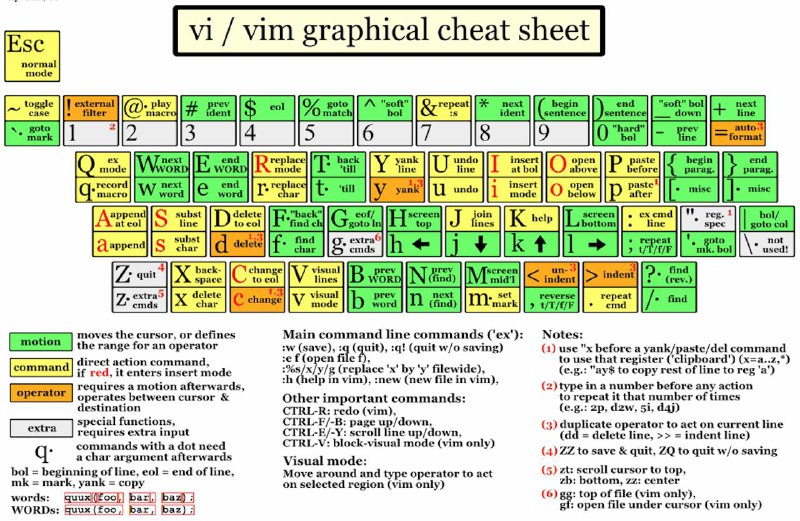
🛠 VI/ VIM: some useful navigation, like structures
I suddenly remembered something about vi/vim, nano, etc. As a result, working on vim is the most comfortable for me, practice still shows when I studied on the good old machines ubuntu, fedora, freebsd on a console/terminal. I decided a long time ago to make myself a blank and share it with you. Let's say so for information.
Operating modes
• Command mode - used to execute commands. When you start Vim, you are in this mode.
• Insert mode - used to enter text. To switch to this mode, press the "i" key.
• Replace mode - used to replace existing text. To enter this mode, press the "R" key.
• Visual mode - used to highlight text for copying, cutting or editing. To switch to this mode, press the "v" key
Navigation
• h - move cursor to the left
• j - move cursor down
• k - move cursor up
• l - move the cursor to the right
• w - move the cursor to the beginning of the next word
• b - move the cursor to the beginning of the previous word
• e - move the cursor to the end of the current word
• 1 - move the cursor to the beginning of the line
• $ - move the cursor to the end of the line
• gg - move the cursor to the beginning of the file
• G - move the cursor to the end of the file
Editing text
• i - insert text before the cursor
• a - insert text after the cursor
• o - insert a new line after the current line and switch to insert mode
• dd - cut current line
• yy - copy current line
• p - paste copied or cut text after the cursor
• u - undo last action
• Ctrl + r - repeat the undone action
Saving and exiting the editor
• :w - save file
• :q - exit Vim
• :wq - save the file and exit
#toolchain #reco